


Share this post



Two weeks ago, I showed you Anthropic’s SDLC playbook for building software with AI. Now I’ve put it to the test, where the rubber meets the road.
The task: build my own CRM. One that I can actually use, not just agent slop.
It sounded like a simple premise. Take the playbook, follow the process, build the app. But things got complicated. And a little gnarly.
Along the way, I learned a lot, changed parts of the process, and ended up building tools to help with the build itself.
So let’s walk through what happened. What worked, what got in the way, what I changed, and how you should approach using the SDLC yourself.
Want to follow these experiments? Subscribe to the AI Will Replace You newsletter.
Watch the full experiment: Building Real Software with Anthropic SDLC (16:27).
Start with the intent. Spend the time.
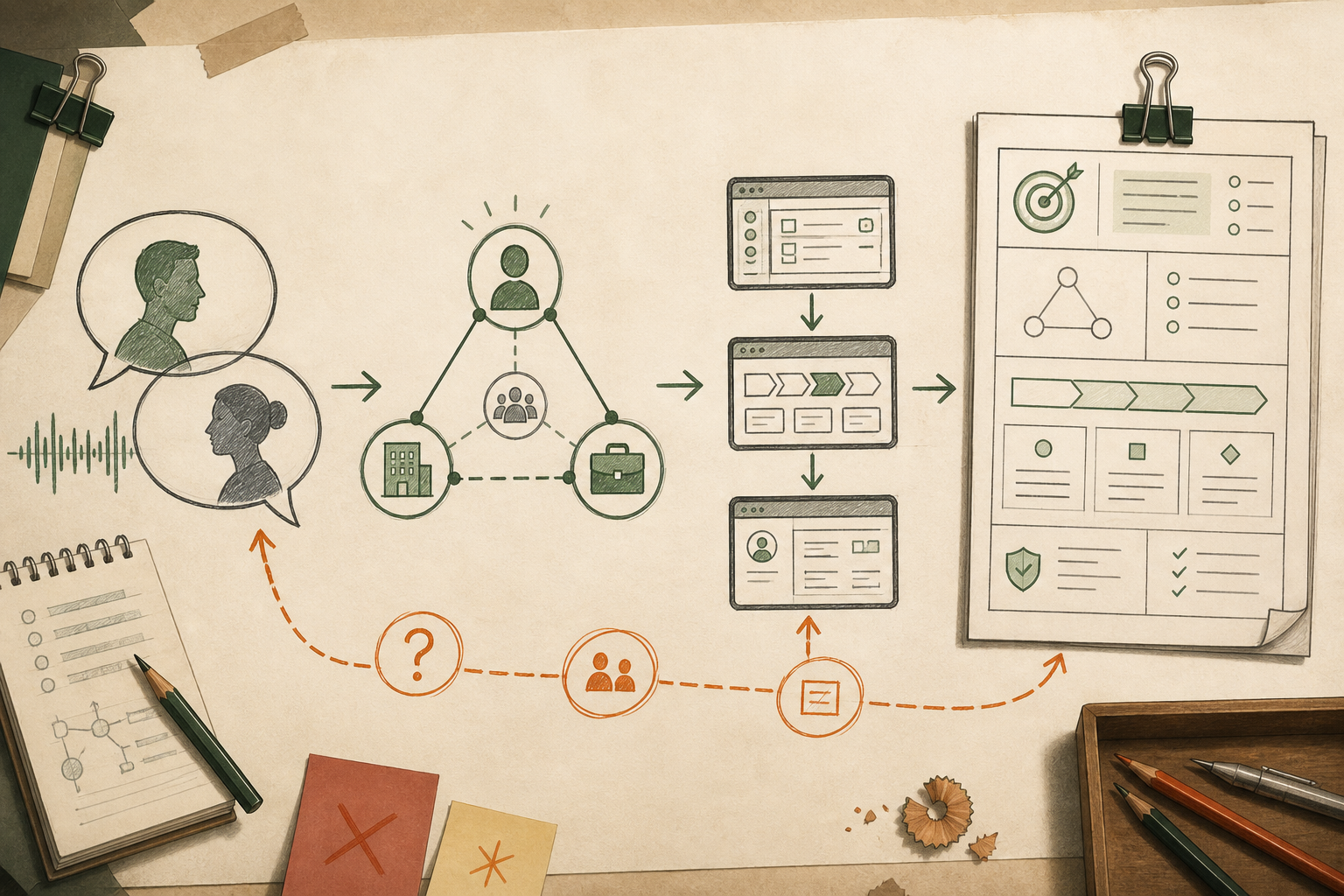
Intent is so important in these systems. “Build me a CRM” really isn’t enough. There are too many decisions hiding inside those four words.
We had a long session working through what I actually wanted. I had the AI interview me, ask questions and dig into the details.
We discussed the ontology: what things exist in this system, what they mean and how they relate to each other. Then the workflows: how I’d actually use it, what happens next, and how things move through the system.
That takes a conversation. You explain something, get a question back, realize you’ve left something out, and go deeper. For this project, that discussion stretched across two days.
From there, we designed some UI around the intent. Putting screens around those ideas gave us something concrete to look at and discuss.
Along with the conversation transcript, we generated a spec that would become the basis for the implementation plan. The decisions we’d worked through could now feed into the build.
If you’re going to use this process yourself, give this part the time it needs. Have the AI interview you. Get into the terminology, the relationships and the workflows. Check that it understands what you mean.
Everything that follows depends on that understanding.
I wanted to see it live. So I rushed.
This is where I got a bit lost.
We did some visual design and put together a plan with screens, but I honestly couldn’t see how the whole thing would work. There were too many screens to follow. I wasn’t sure where to go or what to click.
I looked at the boundaries, and those made sense. But I hadn’t really understood how everything would fit together when I used it.
At that point, I just wanted to play with the thing.
So I rushed through the screens and let it continue. I wanted to see what the AI would give me as a base. Get it running, click around, and figure out what needed changing.
I’m practical like that. I learn a lot by using something. I felt I’d learn more from having the app in front of me than from spending more time trying to imagine it from the plan.
Little did I expect how long the build would take. Or how many tokens it would eat.
And that sent me off on a whole side quest: token optimization, context optimization and harness hacking. I even ran three harnesses head to head: Codex, Claude Code, and DeepSeek on Pi.
Boy, that was fun. There’s a separate breakdown coming on that.
But this is an important part of the story. I had a plan, screens and boundaries I could agree with. I still didn’t have a clear picture of the experience I was asking it to build.
I let it build anyway, because I wanted to find out by using it.
The wall of text is part of the problem
In the video, I called this your favorite game show: scroll through the wall of text and click auto-approve.
It’s funny until you realize that’s how you’re deciding what gets built.
I deal with this a lot. I’ve written about how to stop auto-approving plans you haven’t read, and how to handle the flood of AI-generated PRs. I keep coming back to how we actually understand and review all this output. And here I was, running into it again in my own build.
The agent gives you a detailed plan. You could read all of it, but understanding it takes work. Then how do you respond? Which decisions need a discussion? What have you agreed to without really thinking it through?
This is something I’ve been working on with plan-html. Break the plan into visual chunks that you can look at, question and discuss. Give each decision enough attention to actually understand it.
You don’t have to use my tool. But find a way to have that conversation. Ask it to show you the choices. Ask what a decision means for the app you’re going to use. Push back when something doesn’t make sense.
And as this build showed me, having screens in the plan doesn’t automatically give you that understanding either. I had screens. I still felt lost.
For me, I needed to see how they connected and try the flow. That’s something I’d bring earlier into the process next time.
It did help me improve plan-html, though. There’s a new version coming soon, with more visual planning and support for Anthropic’s SDLC. A lot of that work came out of getting stuck here myself.
The plan needs to help you make decisions. If you’re scrolling past it because you want to get to the build, pay attention to that. I certainly did.
Then I put real data in it.
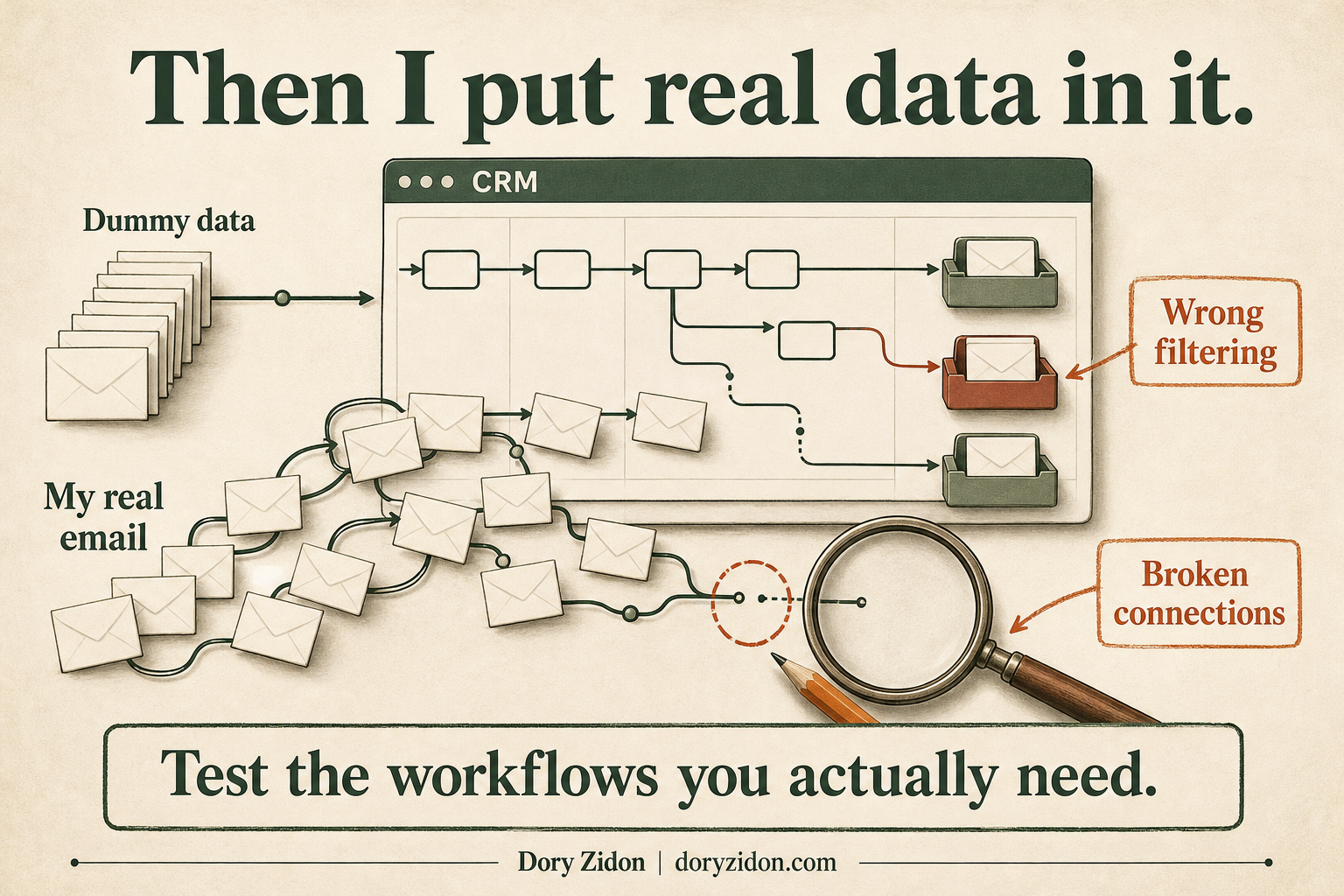
The first build was when I finally got to play with the thing. And once I started putting real data into it, I realized how wrong it was.
The UI was confusing. Some things were clickable, some weren’t, and I couldn’t tell which was which. It was buggy and hard to follow.
Then there were the emails. Connections weren’t working properly. Messages weren’t being read. When it did process them, it misunderstood things and filtered them incorrectly. And I couldn’t work out how those results connected to the rest of the system.
It had built tons of stuff. But trying to use it was a mess.
I’ve seen this happen a lot. You get a huge plan, a long build and a pile of functionality. Then you try to do the thing you actually wanted the software for, and it falls apart.
My evals were off too. I should have had representative test data that exercised those workflows properly. In practice, I used my own real email to test it. That was what exposed the problems. I only really understood them once I had a first build running with real data inside it.
So I went back and built it again. That also sent me on another side quest: rebuilding plan-html around the UI elements, because locking those in was clearly something I needed to take much more seriously.
I needed to understand what I could click, what would happen, and how that connected to the next part of the workflow. Having a collection of screens hadn’t given me that.
And while all this was going on, I was smashing through tokens and the build was taking forever. I wanted to solve both problems. So I started experimenting with other harnesses to see if I could get something into my hands sooner without burning through so many tokens. That’s how Codex, Claude Code and DeepSeek on Pi ended up running head to head.
That’s what I’d change if you’re trying this yourself: bring realistic data and a flow you can actually try into the process earlier. Give your checks examples that reflect what you’ll use the app for. Walk through the UI before committing to a huge build around it.
I learned a lot from that first build. I also ended up building the thing again.
Deployment turned into another side quest
For this project, I wanted everything running on my laptop. So I adapted the deployment phase to fit that.
I set up a dev environment and a prod environment for each of the three harnesses. That’s six environments. Then I put Caddy in front of them, with names I could use to get to the different instances.
What started as “let’s build a CRM” now had me working on local deployment, routing and running three different builds alongside each other.
Off we went again.
There was a practical reason for the setup, though. I wanted to validate changes in one environment before moving them into the one I’d use. And with the different harnesses running, I needed a way to get to each version and try it.
That was my version of deployment for this experiment. The details of the setup deserve their own breakdown, along with the harness comparison.
If you’re applying the SDLC yourself, this is another place to adapt it to your situation. For a team shipping to customers, you’ll have your CI checks, review process and release gates. For my solo build, I needed a local path from development to something I could run and use.
Either way, decide how a change gets checked and how it reaches the environment you rely on. That part still needs thought, even when the whole thing lives on your laptop.
Maintenance: get the problems back into the loop
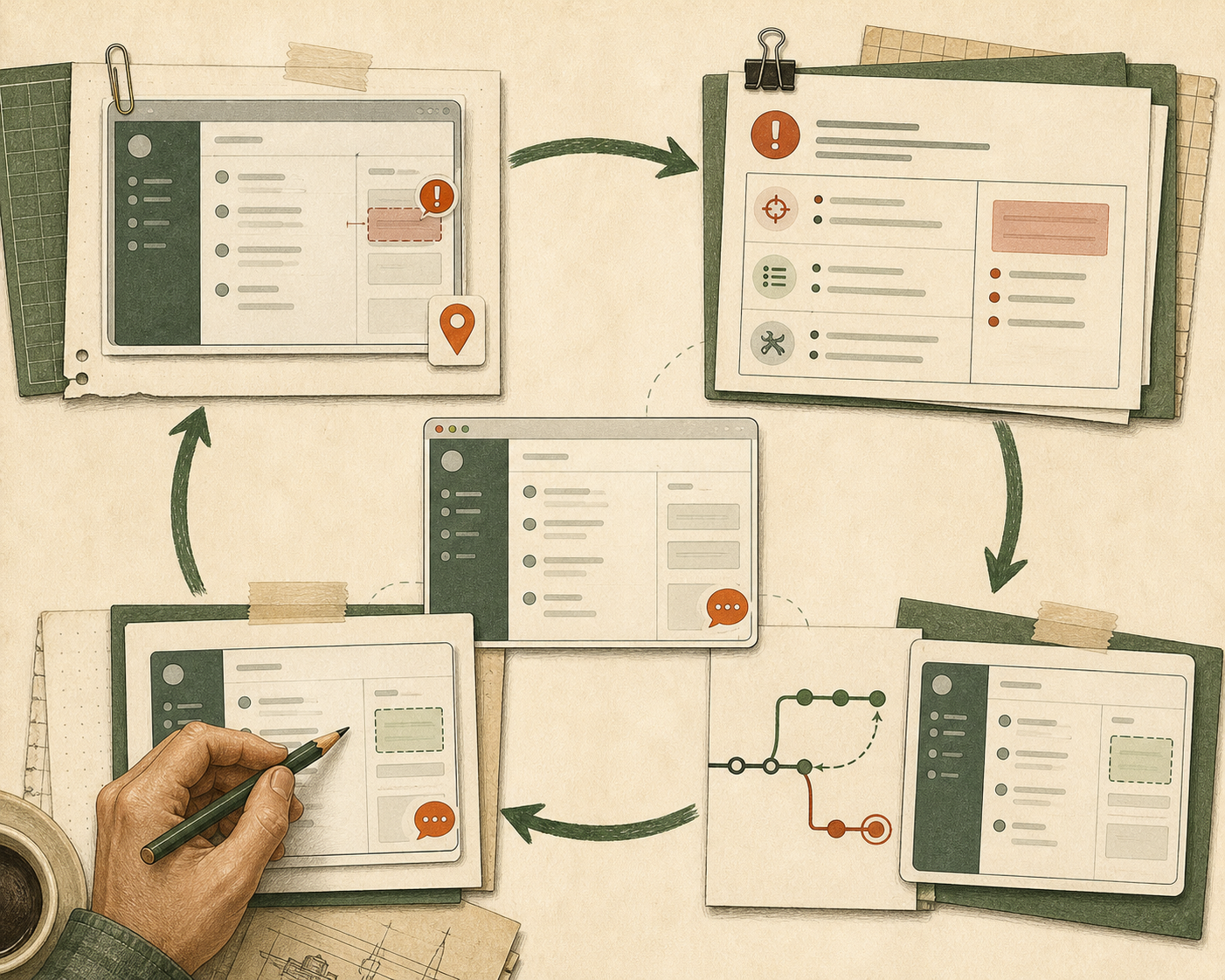
Once you start using the app, you’re going to find more things. Something breaks. A screen looks wrong. A workflow doesn’t behave the way you expected.
Now you need to get that information back to the agent in a form it can act on.
This is where I built bubble-fix.
It’s a small issue tracker inside the app. It can collect frontend errors, and I can also drop in feedback about the UI, including a screenshot. It records the page and what happened, so there’s some context attached to the issue.
From there, I can collect the issues into a fixing intent and trigger another fix cycle. The agent can work on the fixes in a branch, and I can review what came back.
That’s a useful way to apply the maintenance stage to this project. I’m already in the app, trying things and finding problems. I want to capture them there and feed them back into the work.
You can take this further with monitoring and automated diagnosis. Something detects a problem, an agent investigates, and that investigation feeds a proposed fix or a new intent. How much of that you automate depends on the project.
For me, the immediate need was to make it easier to go from “this is wrong” to a specific set of changes the agent could work through.
The bubble-fix release is coming soon, and I’ll show it properly in a separate video. But the idea is worth taking into your own process: make feedback easy to capture, keep the context with it, and give it a clear path back into the next cycle.
Then try the result again. That part is still your job.
Take the process. Make it work for you.
Overall, I think Anthropic’s SDLC gives you a good foundation. I’d use it again.
But following the stages didn’t stop me from approving things I didn’t fully understand. It didn’t make my test data representative. And it didn’t stop the build from taking ages and eating through tokens.
Those were things I had to work through by actually building and using the app.
Next time, I’d still spend the time on intent. The interview, the ontology, the workflows. That work matters.
I’d put more effort into locking in the UI before the big build. Get a flow I can try, understand what happens when I click, and see how the screens connect.
I’d bring realistic data into the checks much earlier. My own emails exposed problems that the dummy data hadn’t helped me understand.
And I’d watch build time and token usage from the start. Those became a big enough problem to send me into a whole separate set of experiments.
That’s what came out of applying the playbook: a build, a rebuild, improvements to plan-html, bubble-fix, and a lot of harness hacking. There’s more to share on all of those.
If you’re trying the SDLC yourself, take it, use it and tweak it. Pay attention to where you get lost, what you’re approving, and what happens when real data hits the system.
That’s where you’ll find out how well the process works for you.
Follow the next experiment
There’s more coming on plan-html, bubble-fix and the harness comparison. Subscribe to the AI Will Replace You newsletter to follow along.
Prefer to watch? Watch Building Real Software with Anthropic SDLC. If you missed the first part, watch the earlier Anthropic SDLC walkthrough.


