


Share this post


I took Anthropic's SDLC, their methodology for building with AI, and used it to build a real CRM. I came out with two things: an app that didn't work, and a subscription with nothing left in it.
The broken app I can live with. Apps get fixed. The empty allowance is the bigger problem, because a process that eats the whole subscription before the app works is not one I can keep running.
The work kept going on other harnesses. That is how one CRM ended up with three of them on one laptop: Claude Code, Codex and Pi. Afterwards I went through the data to see where the tokens went.
Two things stood out. Writing the code was the small part: 16% of agent time. And the browser, the thing I use to check the work, was eating the allowance.
This post is the written version of the video, with the numbers, the caveats that come with them, and the four changes I made afterwards. All four now live in one repo.
The full story of that build is here.

One CRM, three harnesses, two days
None of this was a designed comparison. It came from survival. Tokens ran out along the way, and the other harnesses were what kept the work going. One product, a CRM, and three agent harnesses on the same laptop, each with its own models.
| Harness | Models | Started |
|---|---|---|
| Claude Code | claude-opus-5-5 and claude-sonnet-5-5 | Oct 28, 13:38 |
| Codex | gpt-6-astra and gpt-6.1-sol | Oct 28, 15:53 |
| Pi | deepseek-v4-pro | Oct 29, 11:20 |
Every number in this post is a snapshot from Oct 30 at 06:35, two days in.
Before the numbers, the honest part. This is not a benchmark. I tried to give each one a full build, and it didn't really work out that way. The three did not start at the same time, and they did not start from the same place. Codex built on top of Claude's first 11K lines. Pi joined a day later and worked on a copy of Codex's build.
So when Pi shows up later with a fraction of the hours and a fraction of the cost, part of that is Pi and part of that is the head start.
What it is: a real build with real numbers. That makes it good for one question, which is where the time and the tokens went.
What each one wrote
All three ended with a running CRM. How much each one wrote to get there is a different story.
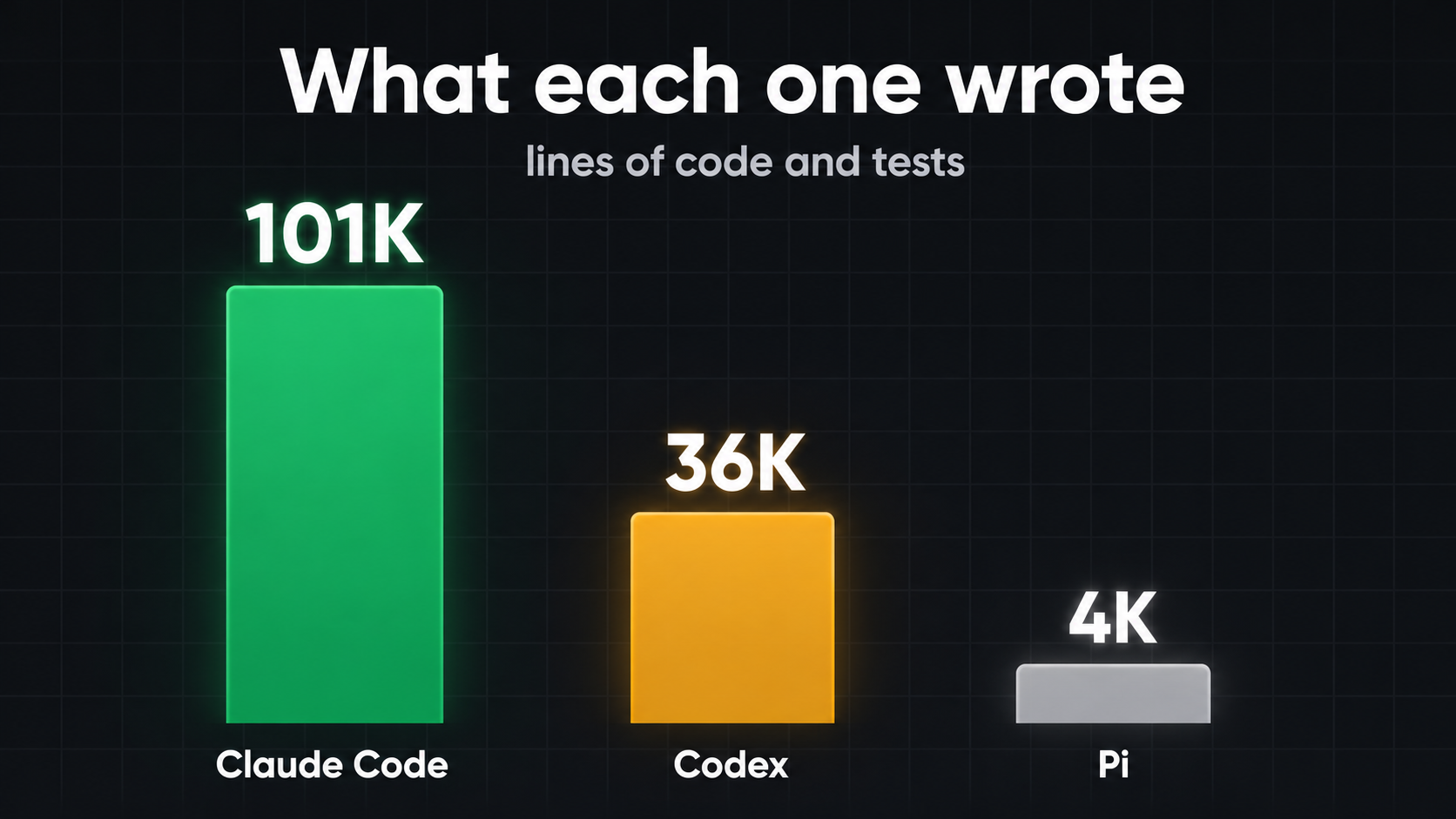
Claude Code: 101K lines. The full v1, built from the plan alone, with 285 helper agents and checks on every step. Of the three, it went the furthest. It also built things I didn't need.
Codex: 36K lines. Also the full v1, on top of Claude's first 11K lines, with 154 helper agents. It landed in the middle: a precise app at about a third of the size.
Pi: 4K lines. I asked it for the full product, and it worked on a copy of Codex's build. One agent, no helpers. Pi is a minimal harness. It doesn't orchestrate subagents out of the box (you can add that), it just gets things out fast.
Lines here means code and tests added by Oct 30.
Hours and cost
Start with time. "Working" means an agent was doing something. The rest of the time the harness was switched on but waiting for my next message, or blocked by the usage limit.
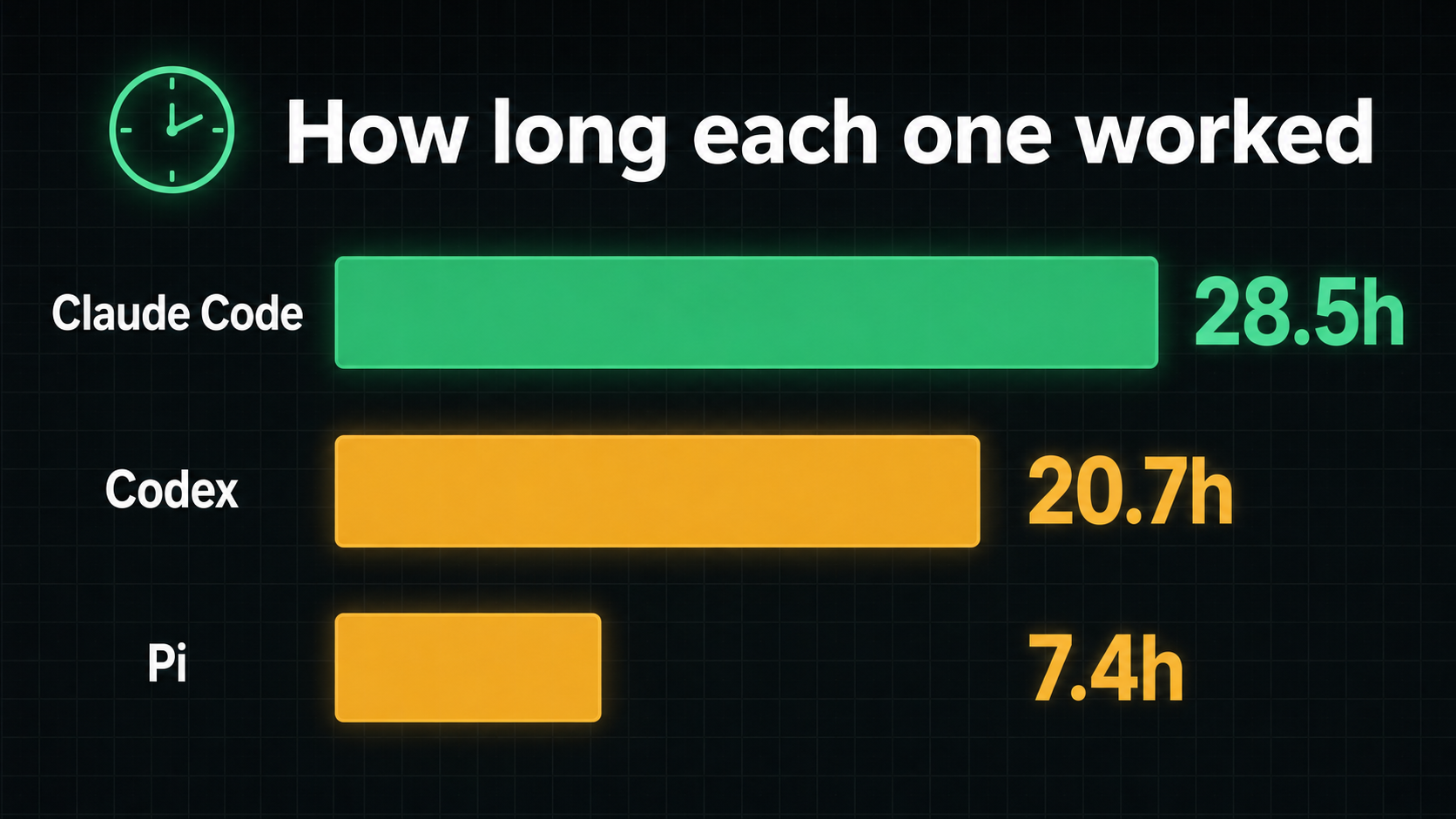
Claude Code worked 28.5 of its 41 hours, 70% of the time. Codex worked 20.7 of 39 hours (53%) and spent far more of the rest waiting for me. Pi worked 7.4 of 19 hours (38%).
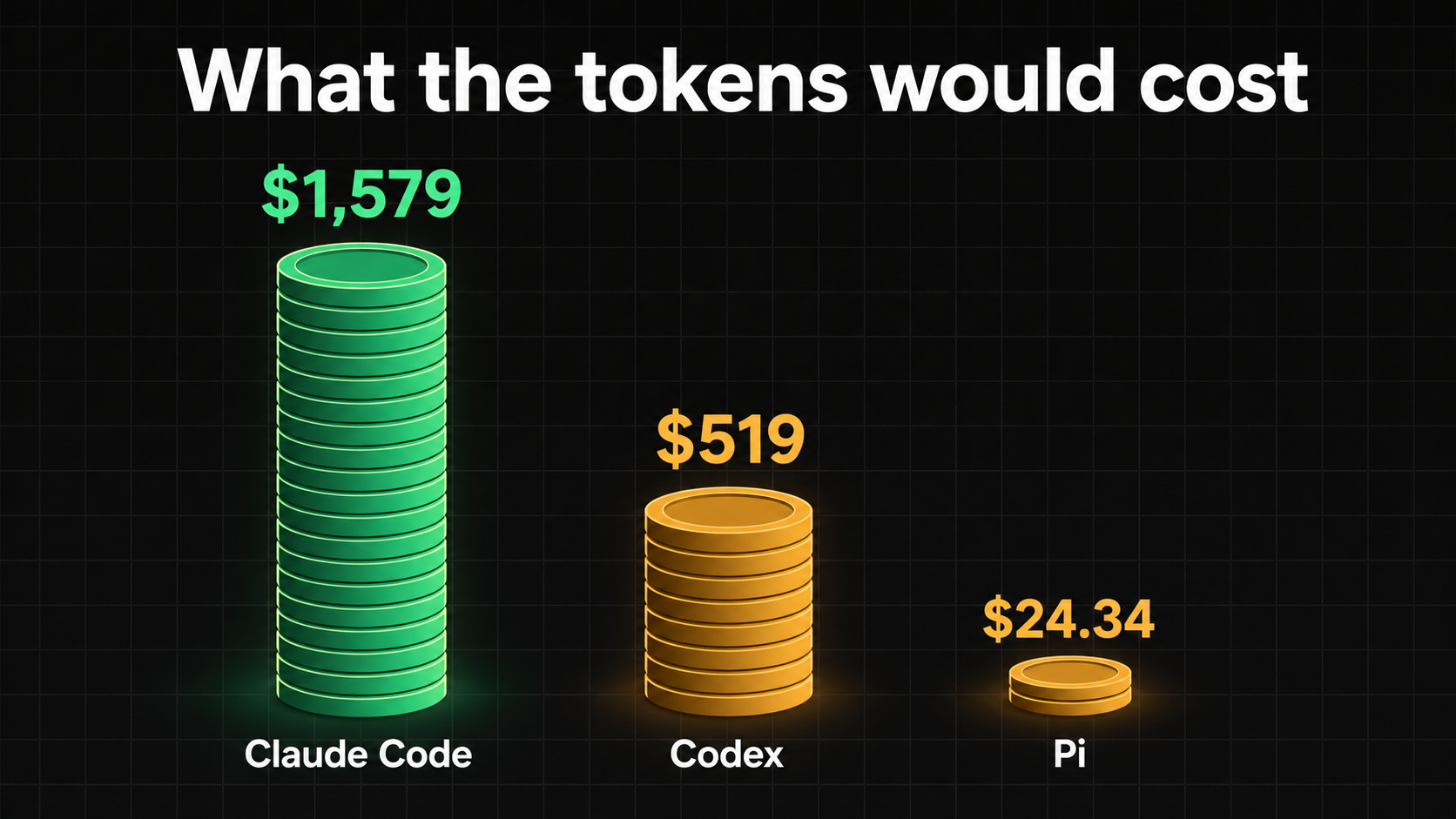
Then the money.
| Metric | Claude Code | Codex | Pi |
|---|---|---|---|
| Lines written | 101K | 36K | 4K |
| Hours working | 28.5h | 20.7h | 7.4h |
| Share of time working | 70% | 53% | 38% |
| Tokens | 4.1B | 932M | 657M |
| Cost | $1,579 (estimate) | $519 (estimate) | $24.34 (real bill) |
The cost row comes with three footnotes. Claude Code and Codex ran on subscriptions, so I didn't pay those amounts: they are what the same tokens would cost at API list prices. Pi's number is the real DeepSeek bill. And about half of Claude's estimate is re-reading cached context, not new work.
Two closer comparisons tell you more than the totals.
| Comparison | Codex | Against |
|---|---|---|
| Fast versus thorough, same plan | 16h, about $252 | Claude Code: 27h, about $1,468 |
| Same six fix steps, same starting commit | 8.9h, about $148 | Pi: 2.2h, $6.29 |
On the first row, "done" meant different things. Codex called v1 complete after 1.75 hours, and then its fix steps took another 14. Claude took 27 hours to reach v1 from the plan alone, with checks and reviews on every step and 1,718 test functions. Claude's own fix round after v1 isn't counted.
The second row is not a fair race. Pi copied 20 of the 31 files from Codex's step 3, ran tests and lint only, and never ran verify. At one point it deleted its own verify rules. Codex ran verify after every step.
What I kept is a hybrid of all three. I move between harnesses depending on the job. On a subscription those dollar figures are theoretical, but the allowance is not: I still ran through it.
Building is the small part
Here is the first thing the numbers showed me. On Claude Code's v1 build, this is where the agent time went.
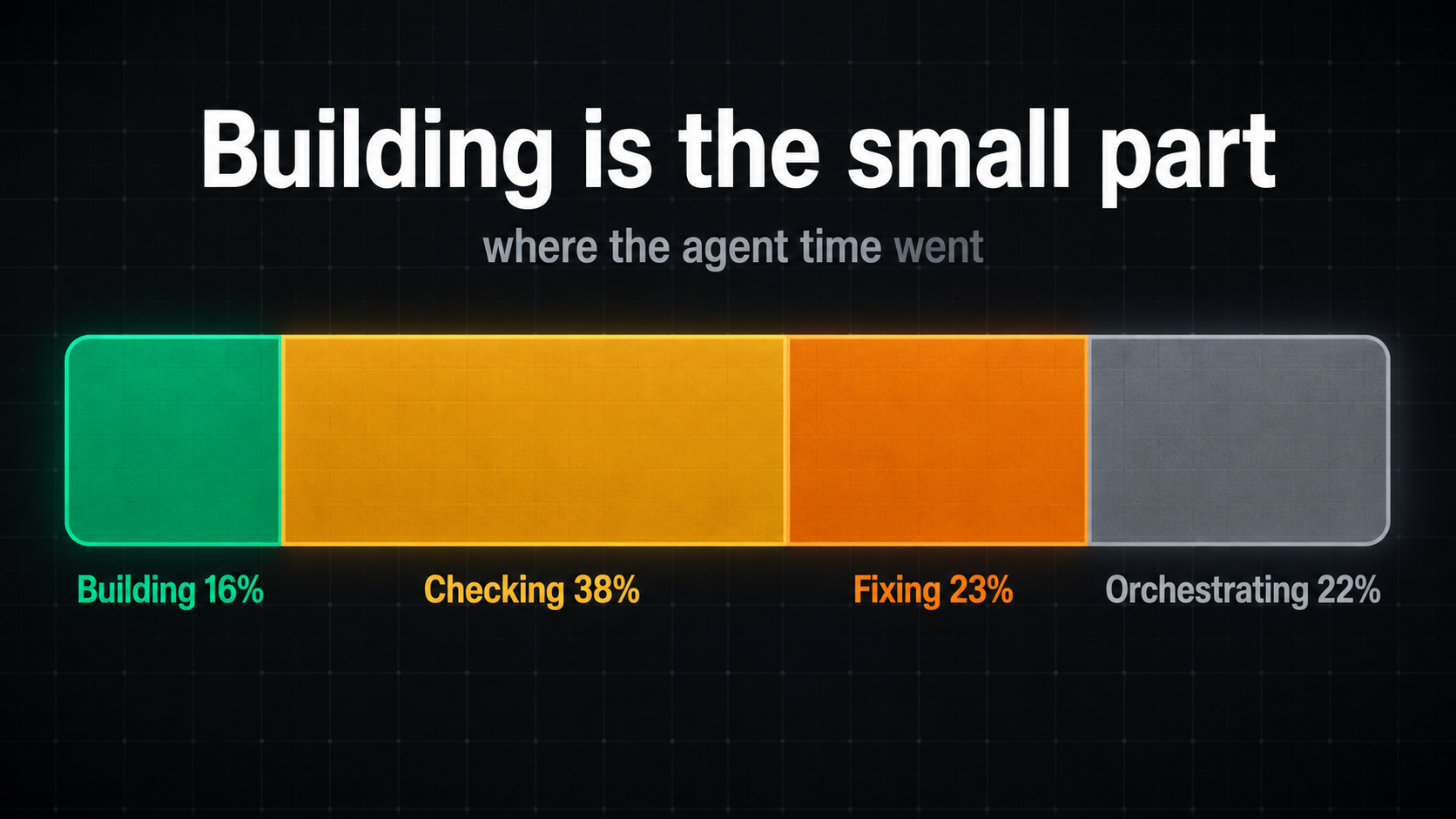
- Building: 16%
- Checking: 38%
- Fixing: 23% (fixing what the checks found)
- Orchestrating: 22%
Writing the code, the part everyone talks about when they talk about AI coding, was about a sixth of the work. Checking alone was more than double that. Put checking and fixing together and 61% of agent time went into making sure the code was right, against 16% producing it.
Orchestrating is the quiet one. One detail shows what it looks like in practice: plan.md was read 375 times by 130 agents, and each read costs about 13 seconds of model turn. No single read is a problem. All of them together come to about 80 minutes of model time spent re-reading one file.
This split is for one harness on one build, so I wouldn't stretch it into a law. But it changes where I look. Models keep getting faster at writing code, and the volume of code keeps growing. A faster coder only touches the 16%. The rest is process: how the work gets checked, how the fixes loop back, and how many agents have to read the plan again.
That is where the four changes later in this post are aimed.
The browser eats the allowance
The second finding is the one that hurt. I use browser automation to check the work: open the page, click through, confirm it does what it should. It is also a place where an agent can fall into loops.
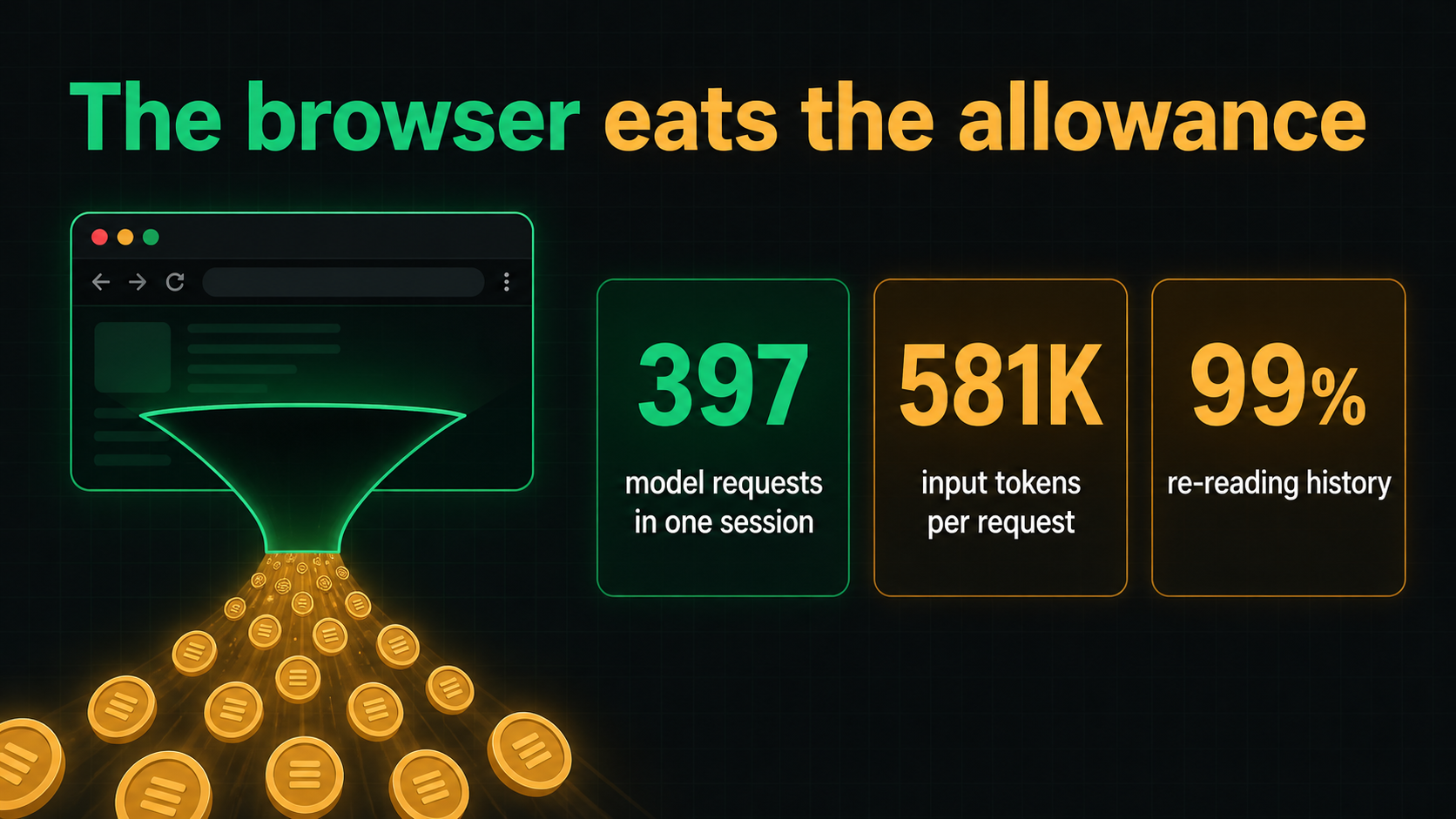
I pulled one browser session out of the logs to see what it cost. It was a Webflow session with 202 screenshots.
- 397 model requests in that one session
- 581K input tokens per request (median)
- 99% of all input was re-reading history
The mechanics are simple once you see them. Every browser step is a turn for the big model, and on every turn it reads the whole conversation again. The new information in each step is tiny. The history is huge, and it grows with every click. So the most expensive model in the setup spends nearly all of its input reading what it has already read.
A caveat: this is an observation from the logs of one session, not a controlled test. But 99% is not a subtle number.
Put the two findings together. Writing the code is the small part, and checking through the browser is where the allowance goes. Neither gets fixed by a better coding model. Both get fixed in the process.
Four changes, one per stage
I didn't fix this with a better model. I hacked the harness and the process. Four changes, one for each stage of the same lifecycle I started from (my walkthrough of Anthropic's playbook is here).
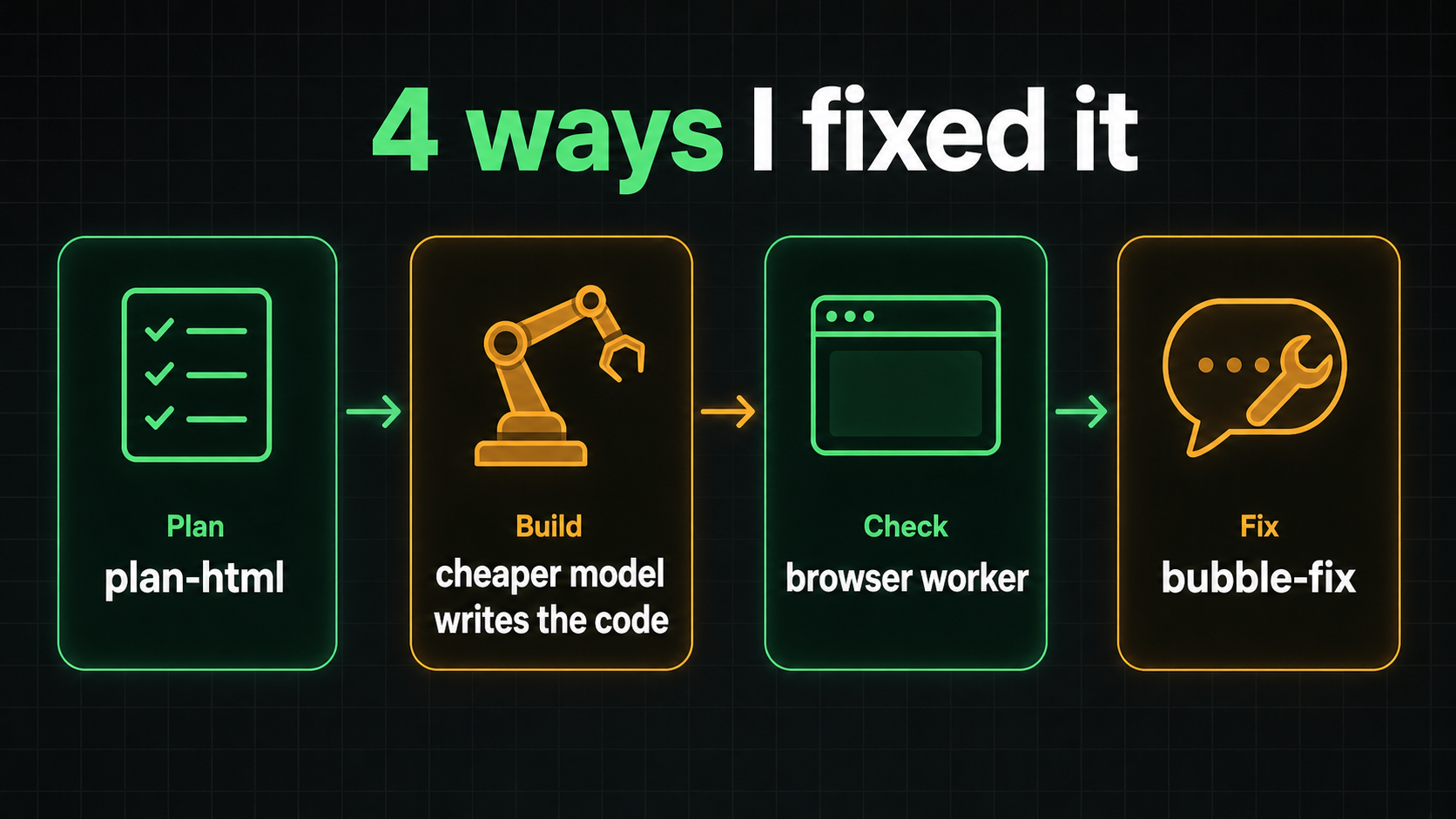
1. Plan: plan-html
The cheapest tokens to save are the ones spent building the wrong thing. plan-html turns the plan into a page I click through, so the decisions get made there, before any build cost starts. Getting that alignment tight at the start also makes the model behave more consistently, which matches what I saw in earlier experiments. I wrote about plan-html in Stop Approving Plans You Didn't Read.
2. Build: a cheaper model writes the code
The expensive model does not need to write every line. It plans and it merges. A cheaper model writes the code, and each builder runs in its own context, so the heavy reading stays out of the expensive model's conversation. A cheaper model is more than good enough for that job.
3. Check: the browser worker
This one goes straight at the 99%. The browser runs through the Playwright CLI in its own context, with a cheaper model driving it. The main model gets small text results back: no screenshot on every step, and no growing history to read again. There is a limit on loops, so a check that gets stuck stops instead of spinning.
There is a step beyond that too. Once a check is stable, it can become a plain script that runs the same sequence every time, with no model involved in the verification at all.
4. Fix: bubble-fix
bubble-fix puts a small bubble inside the app. I report an issue right where I see it, in words or with a screenshot I can mark up. On the backend, handlers catch errors as they happen and log them for the next cycle.
Then I control the cycle: fix the whole list, fix only what I select, or drop an item I don't want. Each one runs as its own cycle that fixes, validates and runs checks. It is a skill, so it starts from the harness or from a click in the UI. The video shows it running live.
I haven't put a number on the savings in this post. What I can say is where each change points: plan-html at rework, the cheaper builder at who writes the code, the browser worker at the history re-reading, and bubble-fix at the fix loop.
One repo, four steps
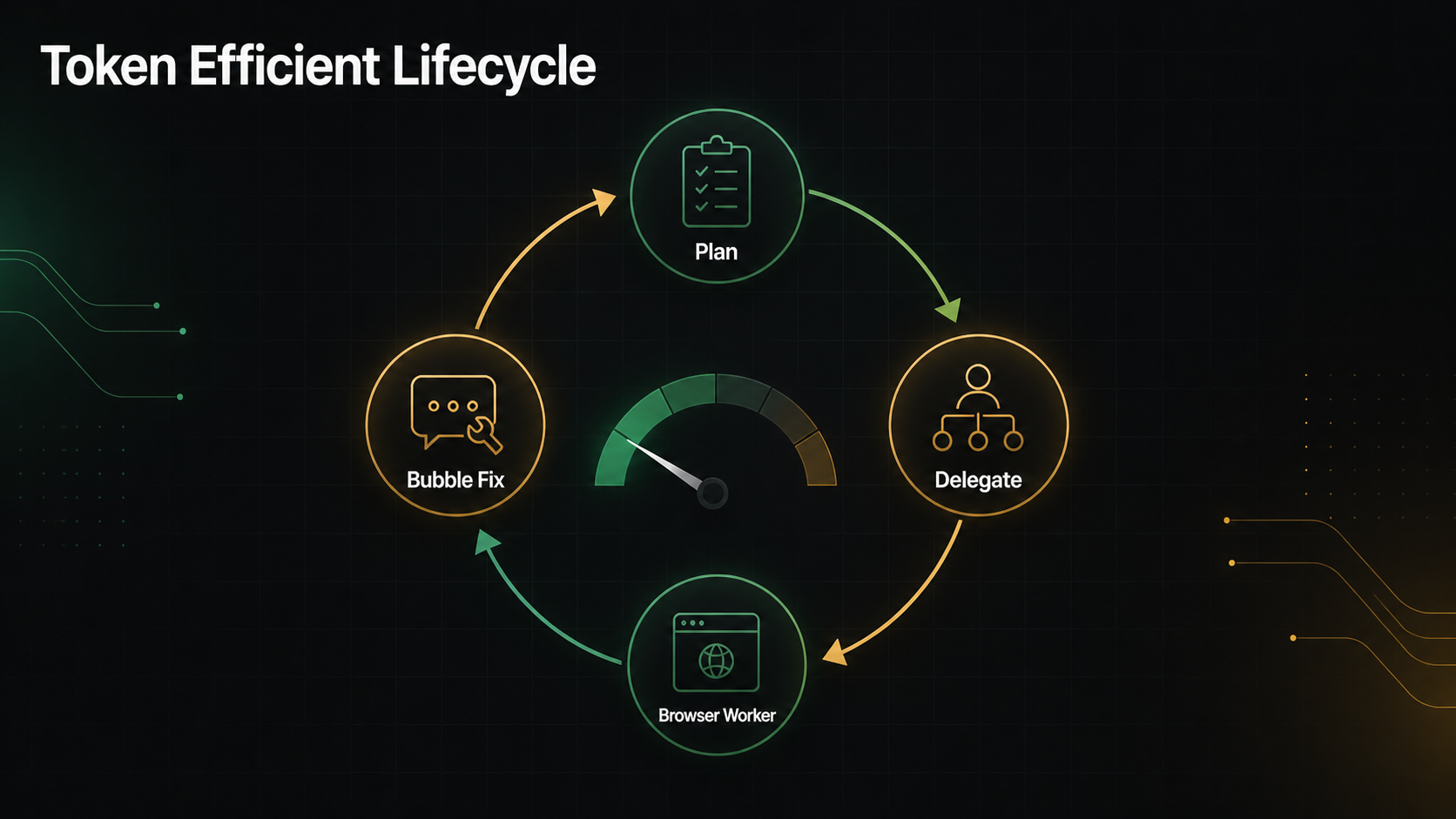
I put all four into one repo: github.com/DoryZi/token-efficient-lifecycle. It covers the whole AI development cycle in four steps: Plan, Delegate, Browser Worker, Bubble Fix.
The idea underneath is the same at every step. The smarter, more capable model does the deciding. A cheaper model does the work in its own context, and only a short result comes back up. Which model plays which role will change. The split stays.
There are two ways in. The tools install as skills, so the agent runs them from inside the harness. Or, for the delegate tool and the browser worker, the repo's prompts hand the job to your own agent, which builds its own version in your stack.
Key Takeaways
- Building was 16% of agent time. Checking, fixing and orchestrating were the rest.
- The browser eats the allowance when every step goes through the main model.
- Alignment before the build is the cheapest place to save tokens.
- The expensive model plans and merges. It does not need to write every line.
Watch the full breakdown
The video walks through the same numbers and shows bubble-fix running live: Anthropic's SDLC Burned My Tokens. 4 Ways I Fixed It.
The full experiment, with the time and cost of each harness, is here: Claude Code vs Codex vs Pi: Two Days Building One CRM.
The repo is at github.com/DoryZi/token-efficient-lifecycle. If you have measured where your own agent time goes, I'd like to hear how it compares.
To follow the next experiments, subscribe to the AI Will Replace You newsletter.


